Theorem and Usage
Prologue: Integers, Floats and Resource limitations
In programming, "Integer" and "Float" are one of the multiple datatypes used for storing numbers. In math, an integer is, well, also an integer. You may also know them as whole numbers (though integers include the negatives too!), while a float is a decimal value.
In Origins, you may know about Resources. Resources, in Origins, have an Integer data type. This means that it's value must either be a positive or negative whole number. Origins: Math extends upon that system to keep compatibility for the already-existing system in Origins. This allows Origins: Math to be more compatible with other Origins addons, instead of rebuilding the entire Resource system from scratch and possibly break compatibility with other Origins addons.
However, compatiblity comes with limitations. Say that you have a Attribute Linked Resource with it's value being the player's minecraft:generic.attack_speed attribute. This has a value of 4, assuming no modifiers or effects. Remember that a Resource's value must be a positive or negative whole number. In this case, the value is perfect, since it's value is 4, a positive whole number.
What if the player's holding a sword? Well, now the attribute has a value of 1.6 (more specifically, 1.5999999046325684, due to floating-point errors). Now, the problem arises, since we now have a value of 1.6, which is a decimal (float), and not an integer. We can remove the decimal part and make it an integer either by truncation or by rounding off, however, doing so will bring some level of error in the resulting value, which you probably don't want. This is why Origins: Math's resources have both a decimal and integer value, which we will explain how exactly do they work in this page.
Keeping compatibility: Pseudo-decimal values
Remember when we said that Resources in Origins have an Integer data type? How exactly can we have a decimal value if the value is supposed to be an Integer in the first place? We can do so by not storing the value in the first place! If you haven't noticed by now, every Resource in Origins: Math that can possibly have a decimal are not editable, but rather, get their values directly from the source!
This method allows us to get both integer and decimal values: integer values for keeping compatibility with Origins' Resources and decimal values for precision within Origins: Math Resources. Origins: Math can use the full decimal value of the Resource while still keeping compatibility with Origins by using the truncated value of the Resource, making it an Integer and satisfying the required datatype that Origins wants! This is also why some actions or conditions have a warning indicating "...can be internally stored as a Float, but normal Origin Resource powers have to be stored as an Integer" or something close to it.
Let us go back to our previous example. If you wanted to multiply the value by 2 using Math Resource (Power Type), then it's Origins value is the full value 3, instead of 2 (1 (due to truncation) × 2 = 2), and when using it in an Origins action or condition such as Resource (Entity Condition Type), it's Integer value: 1, will be used instead!
The neat thing about integers and floats is that integers can actually be written as floats, with a fractional portion of .0. This allows integers to be represented as floats even though they don't contain any fractional portion!
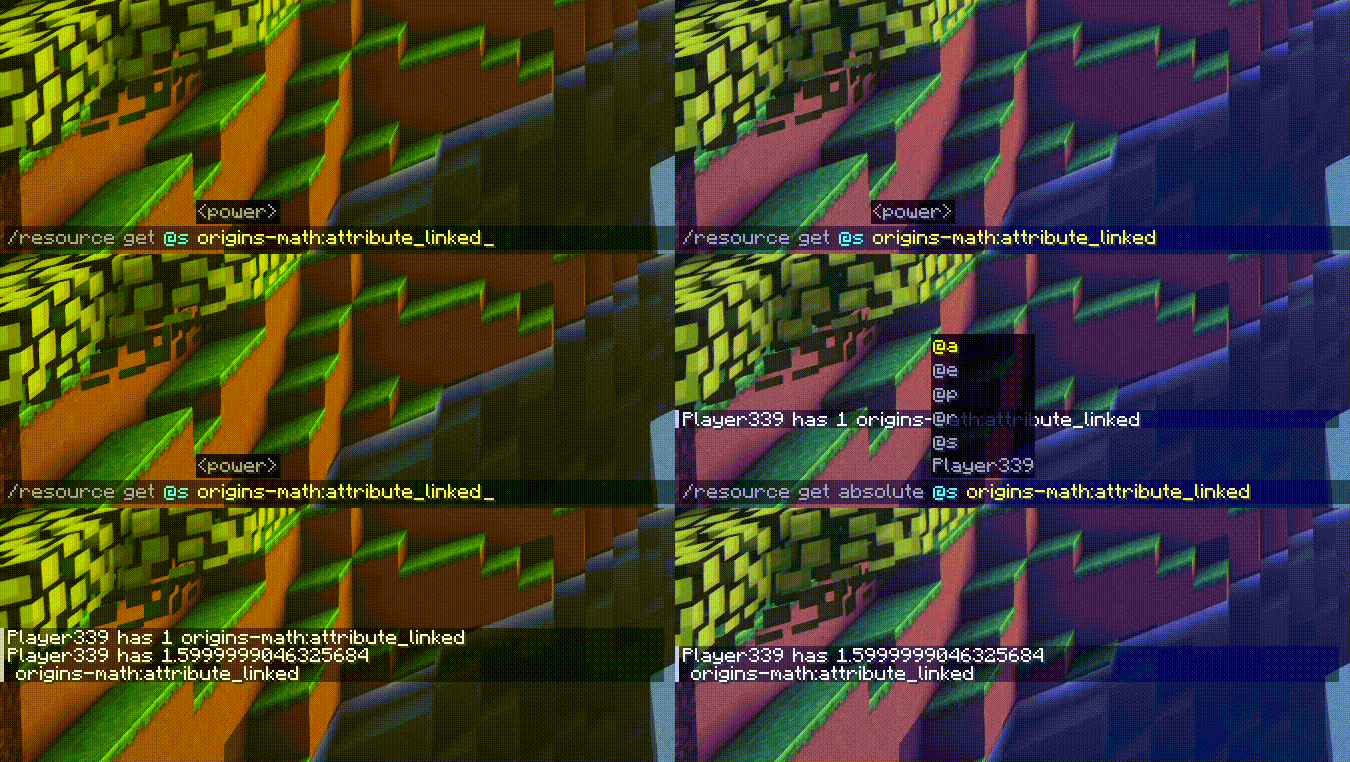
Tip
You can see the "absolute" (Origins: Math pseudo-decimal value) of a resource using the /resource get absolute command!
Variables: The pride of Origins: Math
In Origins: Math, you may have seen Resources being used as values to actions or conditions directly! This is one of the core features of Origins: Math, and is probably one of the reasons why you've decided to download this mod. If you didn't know this, well, now you do! This resource is referred to as a "variable", since it serves as a variable to that action or condition.
Sometimes, an action or condition can accept an integer or float value. Origins: Math allows you to use Resources as it's values using Resource-backed fields, explained in-depth here.
You can use any Resource as a variable, whether it'd be from Origins (powers with Cooldowns, Resource (Power Type), etc.) or from Origins: Math (Attribute Linked Resource (Power Type), Math Resource (Power Type), etc.)
Sometimes, you may encounter actions or conditions in Origins: Math that accept a Variable Declaration. Much like Resource-backed fields, you can use any Resource as a variable, whether it'd be from Origins, Origins: Math, or a Power Type from an Origin addon that is also a resource.